

Let’s be real: we all have a love-hate relationship with PDFs. Or, more accurately, we have a love-hate relationship with the software we’re forced to use to open them. If you’ve ever felt like Adobe Acrobat is holding your computer hostage with its massive install size, constant "sign-in" prompts, and background processes that never seem to sleep, you aren't alone.
That’s why I was so excited to see KillerPDF v1.2.0 making waves on r/opensource this week. It’s a tiny, powerful, and completely free alternative that feels like the "Notepad" of PDF editors.
What exactly is KillerPDF?
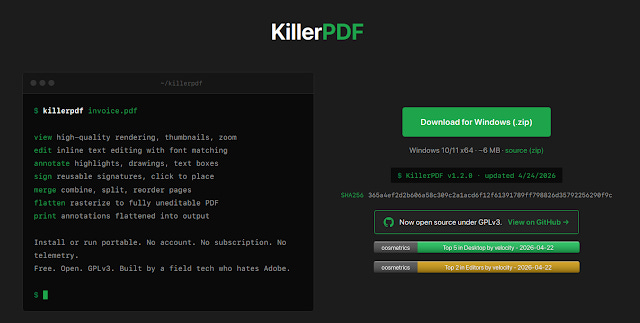
Created by a developer who—quite frankly—just got tired of Adobe’s subscription model and bloat, KillerPDF is an open-source editor for Windows. The whole thing is a single executable file (about 6MB!) that focuses on privacy and speed. There’s no cloud, no telemetry, and no account required. Everything stays on your machine.
What’s New in v1.2.0?
The latest update just dropped some "quality of life" features that make it much more than just a simple viewer:
The "Install or Run" Choice: You can still run it as a portable app from a USB stick, but it now includes a super clean self-installer. It doesn't even need Admin rights—it just drops into your local app data and sets itself as your default PDF handler if you want it to.
Handle Passwords Like a Pro: In the past, locked PDFs would just throw an error. Now, KillerPDF prompts you for the password and opens the file seamlessly, keeping the decrypted copy safely in your temporary memory for the session.
The "Flatten" Feature: This is a lifesaver for anyone in legal or admin work. It can now rasterize your entire document at 150 DPI. This "burns" your annotations and signatures into the file so they can’t be edited or removed by someone else.
The Best "Classic" Features
Even before the 1.2.0 update, this tool was punching way above its weight class. It handles the stuff we actually do every day:
Inline Text Editing: You can actually double-click text and change it. It even tries to match the original font so your edits don't look out of place.
Draw & Sign: You can save your signature and drop it onto a doc in two clicks.
Merge & Split: Need to combine three files or just save page ? You can drag and drop pages to reorder them instantly.
If you’re on Windows 10 or 11, you don't even need to install any extra runtimes; it just works. It’s rare to find a tool that is this lightweight (~6MB) but still lets you actually edit things rather than just highlighting them.
If you’re tired of "cloud bullshit" and just want a PDF tool that opens fast and respects your privacy, give KillerPDF a look.
Check out the source code on GitHub.